Add KOLens as a Custom Connector in Claude (MCP + OAuth 2.1)
One URL. One Approve click. Claude can now drive the entire KOLens product surface inside any conversation — no plugin install, no API-key paste.
Quick answer
https://kolens.ai/mcp → click Connect → log in to KOLens → click Approve. Claude can now use 15 KOLens tools inside any conversation. Revoke anytime at /account/connections.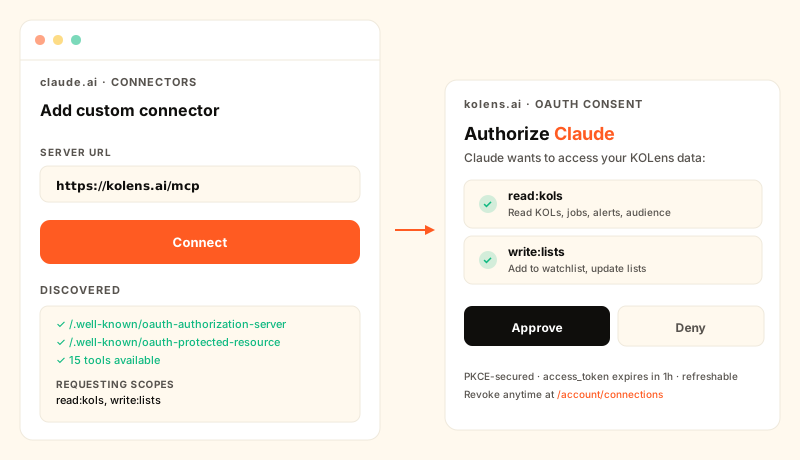
Why MCP changes the integration story
Until now, "use KOLens from an AI" meant one of two things: either install a stdio MCP plugin in Claude Desktop (works, but single-machine and single-user) or paste an API key into your Continue config and hope Continue doesn't leak it (works, but every prompt has to remember which API to call).
Custom Connectors collapse both into a network protocol. KOLens publishes its tool surface at one URL; Claude.ai (or any MCP client) discovers it; users authenticate once via OAuth and the connection persists. From the user's side it's "I added a thing to Claude" — same affordance as adding a Slack integration.
Setup in 60 seconds
- 1In Claude.ai → Settings → Connectors → Add custom connector.(The exact path may vary slightly across Claude clients; look for "Custom connector" in any Connectors / MCP settings panel.)
- 2Paste https://kolens.ai/mcp and hit Connect.Claude fetches our discovery docs at
/.well-known/oauth-authorization-server+/.well-known/oauth-protected-resource, sees that we speak OAuth 2.1, and self-registers viaPOST /oauth/register(RFC 7591 dynamic client registration). - 3You're bounced to a KOLens consent page.The page shows which scopes Claude is asking for —
read:kols+write:listsin the default request — and lists the tools each scope unlocks. Click Approve. - 4Claude gets a 1-hour access token + a refreshable refresh token.You're returned to Claude with the connection live. The access token expires every hour; Claude rotates it automatically using the refresh token without bothering you.
What Claude can do once connected
13 tools across 3 scopes:
read:kols — research
list_kols— query the accumulated KOL database (filter by keyword, role, follower count, etc.)get_kol_profile— full KOLens profile for one TikTok handlelist_recent_jobs+get_job_status— your recent scrape runslist_discovery_plans— your scheduled keyword scrapeslist_alerts— recent growth alerts (rising_kol, trending_video, audience_drift)get_audience_snapshot— latest sampled-follower snapshotlist_kol_lists+get_list_members— your curated lead listslist_watchlist— your tracked KOLs
write:lists — small mutations
add_to_watchlist/remove_from_watchlist— manage trackingmark_alert_read— clear notifications
run:scrape — paid actions (not requested by default)
Reserved for tools that charge credits (kicking off a fresh keyword scrape, running a handle lookup, generating a new audience snapshot). Claude doesn't ask for this scope in the default consent request — you'd have to explicitly grant it on a future re-auth — so a careless prompt can't accidentally spend $20 of credits.
Security model
- PKCE required — public clients can't skip the verifier exchange.
code_challenge_method=S256only; theplainfallback that RFC 7636 permits is disallowed. - Opaque tokens, not JWT — cheaper to revoke (single column flip) and doesn't leak claims to anyone snooping the wire. The
kolens_at_…prefix makes them scannable in logs without decoding. - Hashed at rest — only SHA-256 hashes hit the DB. A leak of the database alone can't be replayed against the API.
- Single-use auth codes — replay sets a
used_atmarker and the code becomes inert. - Per-user revocation — Disconnect from
/account/connectionsbulk-revokes every live token for that (user, client) pair. Cascades from refresh → paired access tokens so it feels atomic.
Useful prompts
- "Find me 5 phonecase TikTok creators with email + at least 50K followers" → Claude calls
list_kolswith the right filters. - "What's the audience country mix for @minicaseco?" →
get_audience_snapshotreturns the latest snapshot or{ snapshot: null }if none exists yet, prompting Claude to suggest you run one. - "Mark the rising_kol alerts about @uglycaseguy as read" → list + filter + bulk
mark_alert_read.
What's next
Streaming responses for long-running tools, Supabase-cookie-based consent (so the consent page doesn't ask for an API key), per-tool budget caps, refresh-token rotation. None block usage today; the connector works end-to-end.
Frequently asked
- What's MCP?
- Model Context Protocol — Anthropic's open spec for connecting LLMs to external tools and data. An MCP server exposes typed tools; an MCP client (Claude.ai, Continue, MCP Inspector) discovers + calls them. KOLens speaks the streamable-HTTP MCP transport so any compliant client can connect over the network.
- Is this the same as installing a plugin?
- No — better. Plugins ship as zip bundles; users install them locally. MCP Custom Connectors live as URLs; users paste the URL once and the connection persists across all their devices, all their conversations. Multi-tenant from day one.
- How does authentication work?
- Standard OAuth 2.1 with PKCE. Claude discovers /.well-known/oauth-authorization-server, registers itself as a public client via dynamic client registration (RFC 7591), redirects you to KOLens' consent page, you approve, KOLens redirects back with a code, Claude exchanges it for an access token, and every subsequent MCP call carries that token. Tokens are opaque (not JWT) and revocable.
- What scopes does Claude request?
- By default, read:kols + write:lists. read:kols covers everything you'd want to ask Claude to LOOK UP (creators, ads, alerts, audience snapshots). write:lists covers the small set of mutations (add to watchlist, mark alert read). The third scope — run:scrape — is reserved for tools that charge credits; Claude doesn't request it by default so a careless prompt can't accidentally spend money.
- How do I revoke Claude's access?
- Go to /account/connections in your KOLens dashboard. Each authorised app shows the scopes it has + when it was last used + a Disconnect button. One click revokes every active token for that app — Claude's next call gets 401.
- Does Claude see my whole KOLens history?
- Only what your account can see. The OAuth token is bound to your Supabase user_id; tools that scope by user (list_watchlist, list_discovery_plans, list_kol_lists, list_alerts) only return YOUR rows. Tools that read shared workspace data (get_kol_profile) return the workspace pool — same as the web UI.