Automate TikTok KOL discovery — Discovery Plans run daily for you
Type the keyword once. KOLens scrapes it every day at the same time and grows a fresh creator cohort on autopilot — only new faces, no duplicates.
Quick answer
Why automate
A one-shot keyword search on the keyword phonecase on Monday surfaces the top 200 creators in that niche as of Monday. By Friday some have grown 2×, others have gone dark, and 30 new faces have crossed the engagement-rate threshold you care about. Re-running the search by hand every day is the kind of busywork SMM teams quietly drop after week three.
Discovery Plans take it off your plate. The keyword runs on its configured cadence, deduplicates against prior runs, applies the filters you set once, and lands the net-new matches in a KOL list — by the time you log in on Friday morning, the cohort is already a week broader.
Setting up a plan in 60 seconds
- 1Open /discovery-plans → New plan.The form is short on purpose: a plan is a saved keyword + an interval + optional filters, nothing more. No multi-step wizard, no SQL.
- 2Fill the four required fields.Plan name is an internal label. TikTok keyword is the query. Interval (hours) accepts 1-720 — 24 is the sane default since TikTok's FYP rotates daily. Max videos / run ranges 1-2000; 100 is the entry level (10 credits per run).
- 3Add filters + target list (both optional).Filters are the auto-add gates: min / max followers, require email. Failed creators still appear on
/kolsbut don't enter the target list. KOLens can create the target list inline if you don't have one yet. - 4Save → flip Activate to start the schedule.Plans default to draft so a stray Save can't quietly burn credits. The detail page has an Activate toggle and a Run-now button if you want to test once before letting the scheduler take over.
The schedule pill
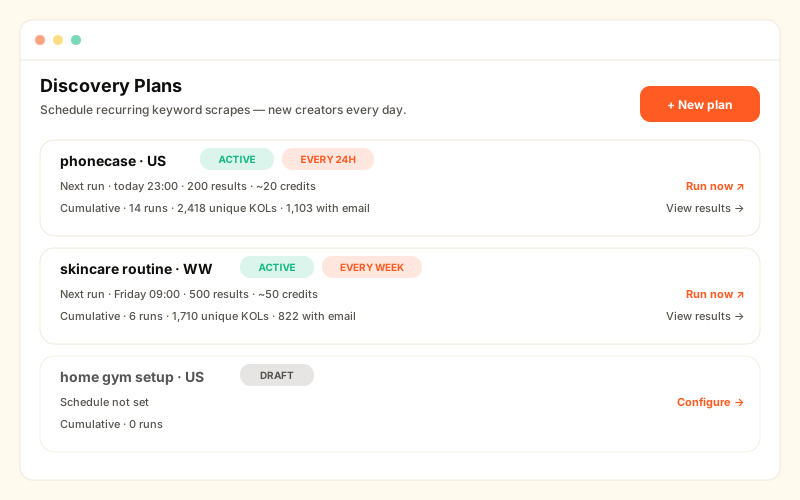
Every plan on /discovery-plans shows a colour-coded chip:
- Auto · every 24h · next in 3h (green) — actively scheduled.
- Paused — was every 24h (amber) — disabled, won't run until reactivated.
- Manual only · not scheduled (grey) — draft. Run-now works; the scheduler skips it.
Reading the results
Hit View results → on the plan detail page to see:
- Summary stats — total runs / successful / total videos / KOLs found / credits spent.
- Run history table — every job the plan has spawned, with per-run credits charged and links to that run's video grid.
- Aggregated video grid — every video across every run, deduped, with a per-tile badge linking back to the specific job each video came from.
Cost control
Two safeguards:
- Pre-charge per run — KOLens deducts credits when a run is queued, not after. Surprise bills are impossible.
- Out-of-credits auto-skip — if the plan owner's balance is below the run cost when the scheduler ticks, that tick is skipped (with a log line) and the schedule advances to the next slot. The plan retries on its normal cadence after the balance is topped up; it doesn't busy-loop or queue a backlog.
Run-now vs scheduled
Run now on the plan detail page spawns a one-off job immediately, without touching next_run_at. Works on any plan, including disabled / draft — useful for kicking off a manual cohort refresh before a campaign briefing without flipping the plan active.
Frequently asked
- Why isn't a single keyword search enough?
- TikTok creator cohorts churn constantly — new accounts blow up weekly, established creators pivot niches, sponsored accounts cycle in and out of the For You feed. A one-shot search on Day 1 misses everyone who rises on Day 7. Discovery Plans solve that by re-running the same query on a schedule.
- How does deduplication work?
- KOLens keys creators by their TikTok @handle. A creator who shows up in Run 1 and Run 7 still creates a fresh DBJobVideo mapping for traceability, but the canonical author row is updated in place — they're not double-listed on /kols and don't get auto-added to a KOL list twice.
- What happens to credits when a scheduled run hits an empty result set?
- If the Apify call errored before fetching anything, KOLens refunds the pre-charge. If the call succeeded but returned zero matching creators (rare keyword + filter combos), the charge sticks — we paid Apify for the request, so the user pays us.
- Can the auto-add filter be more aggressive than 'all results'?
- Yes — set min_followers / max_followers / require_email when creating the plan. Only creators clearing those gates get added to the target KOL list. Useful pattern: scrape broadly (200 results), filter strictly (require_email + min 10k followers), end up with ~30 high-quality additions per day.
Read next
How to find TikTok KOLs by keyword (with verified emails)
KOLens crawls TikTok live, ranks 200+ creators by engagement, and extracts the verified business emails from every bio link — in under one minute. No annual contracts.
Posting cadence, account age & creator silence — what KOLens measures
Don't sponsor a dead channel. KOLens computes account age, first/last video, median posting cadence and videos-per-week for any TikTok creator — flags accounts that quietly stopped posting.